Here are the steps to install Transdroid when you use µTorrent on Windows:
Setting up µTorrent
The by far most popular Windows torrent client is µTorrent. It is full featured, fast and lightweight. Transdroid supports µTorrent 1.8.x and the 2.0 beta should also work. The token.auth system is supported now as well.
µTorrent can be downloaded from the official website. It doesn’t really matter if you choose the stand-alone or installer package. The first thing we want to do is start µTorrent and set up the web UI (user interface) that Transdroid needs in order to connect to it.
Go to ‘Options -> Preferences’ and select the ‘Web UI’ tab. Here, check the ‘Enable Web UI‘ box and make up some name and password. I advise to check the ‘Alternative listening port’ box as well and set it to port number 8080. Remember the username, password and port number, because we need them later on.

You should now test if the web UI works. Open your browser and go to http://localhost:8080/gui (assuming you indeed used port 8080). It will ask for your username and password. If you do not see the web UI or can’t log in, go back to the program to check you settings.
Remember that you always leave the application running to allow Transdroid to connect to it.
Allow access from anywhere
The next step is very important if you want to use Transdroid to control µTorrent from anywhere you go and not just your home Wi-Fi network. You will need to open up the port 8080 and redirect this to your home computer. First get your Window computer’s local IP address. Where you find this depends on your Windows version. On Windows Vista, left-click the Network Connection icon in your system tray, in the very bottom-right corner of your screen, and choose ‘Network and Sharing Center’.
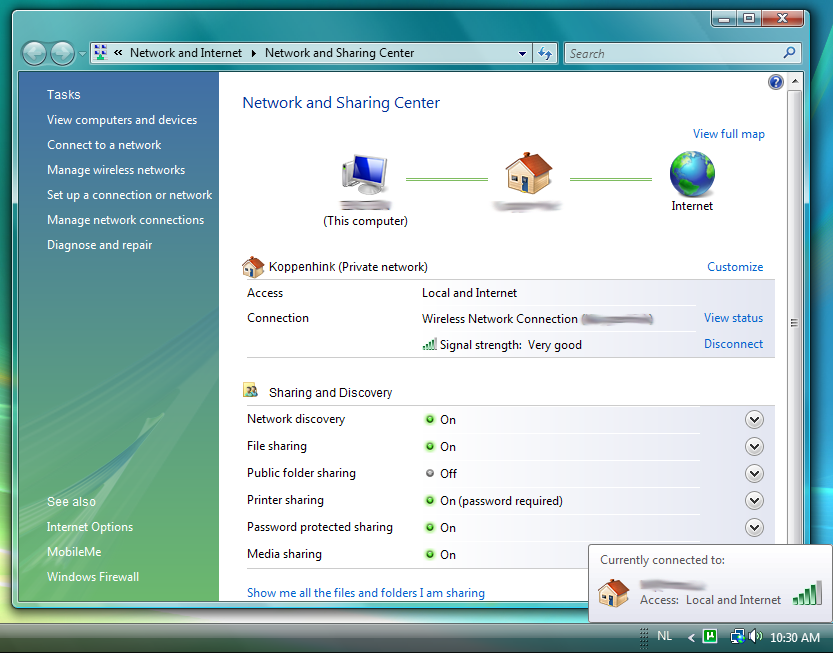
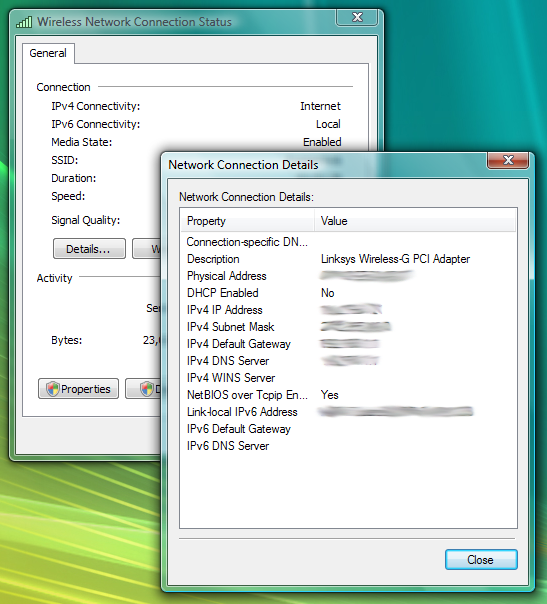
Next, click on ‘View Status’ and then on the ‘Details’ button. This window shows you all the connection details for your active network adapter. You should note down the ‘IPv4 IP Address’. This is your local IP address that you will need to redirect any external traffic to.
An alternative on both Windows XP and Vista is to run the ipconfig.exe command. Hit ‘WindowsKey-R’ and in the ‘Run’ dialog box that pops up enter ‘cmd.exe’ and click ‘OK’. In the command window, enter ‘ipconfig.exe’ and look at it’s output. For the adapter that is active it should show you a IPv4 Address. This is the local IP address that you need to write down.

Now go to your the manager interface of your router or ADSL modem. It will most likely have a NAT tab or settings screen. Here you will need to set up a port forward from all external traffic on port number 8080 to you local computers’ IP address – the one that you just retrieved – on the same port. There are too many routers and ADSL modems to make detailed explanations here, but you can use the website PortForward for in-depth help.
Setting up Transdroid
The final step is to set up Transdroid. Install the software from the Android Market and open up the application. You will see a message that you need to set up a server configuration first. Hit your Android device’s menu button and choose ‘Settings’. Next, click the ‘Add a sever’ button to create your first sever configuration. You can add more later, if you need to.
Now fill in all the settings. The name is totally up to you. From the type menu you choose for µTorrent of course.
The IP address is your server’s external IP address. If you do not know this, open up a browser on your Windows machine and surf to whatismyip.com. It will present you the external IP address that you need in Transdroid.
The port number is the next setting and is 8080. (Except for when you choose to use something else, of course.)
Choose to enable authentication and fill in the web UI username and password that you entered in µTorrent.
Time to test your settings! First disconnect from the Wi-Fi network if you are connected to the local network (the one where your Windows machine is in as well). This is important, because you will need to use different settings for that.
Now, hit the back button of your Android device twice to return to the main screen. It should now state that it is connecting to the sever. After a couple of seconds you should get a listing of all the active torrents in µTorrent. Rewards yourself by downloading some torrents, right from your phone. 🙂
Local Wi-Fi network access
One thing you should know when you have a Wi-Fi network at home, is that you cannot use your external IP address as described above while you are connected this way. When connected to the wireless network that your Windows machine is in, you will need to use your machine’s internal IP address instead.
Easiest thing to do is to open Transdroid’s settings menu again and add a new sever configuration. Use the exact same details that you used before, but now use your Windows machine’s local IP address. Of course you also want to give it a name that identifies it as being your local configuration.
Give it a test by going to the main screen and choose ‘servers‘ from the menu. You can select the other configuration from the pop-up menu. A little tip: switching servers can also be done by swiping your finger from left to right (or the other way around). No need to open the menu each time!
Troubleshooting
If Transdroid refuses to connect you, use these steps to trace the problem.
First try to connect to the web UI directly from your Windows machine. Start a browser and surf to http://127.0.0.1:8080/gui. (Check if you indeed set the listening port to 8080 in µTorrent’s web UI settings.) If you receive a page not found error, you didn’t enable the web UI.
If you are presented a login screen but are refused access, please check your username and password, maybe re-enter them. As long as you cannot even access the web UI, Transdroid will not work as well.
If this direct connection works, check if you can connect using Transdroid while connected on your internal Wi-Fi network. Remember to use you internal IP address now. If this works but external connections via 3G/EDGE don’t, you have not set up the port forwarding correctly.
Still having troubles? Use the ‘error report’ feature in Transdroid’s menu to get personal help.
Good luck and enjoy!
I keep getting “ERROR BUILDING REQUEST”
Please mail me your configuration details to transdroid@gmail.com for personal support.
I am also getting error building request
Please check your (authentication) settings. It the problem persists, you may mail me with further details for personal support.
Having the search icon on the main screen would be great, as would being able to choose when to leave the search screen, so you can select multiple entries on the search (ie several episodes of a TV show), without having to go back a redo the search for each episode.
Otherwise great job !
I have created a feature request issue for this here: http://code.google.com/p/transdroid/issues/detail?id=81
Cool.. app.. i use it with utorrent.. but can it just list the current torrent downloading instead of all the torrents that was stopped?? that would be nice =)
If I understand it correctly, you want to see all the torrents that are downloading in the list, not all of them? Just use the button with the down arrow to switch to that view. If you also don’t want to see any torrents that have a download speed of 0KB/s, you can use the new filtering options found in the ‘filter list’ menu.
Up and running, great app! Only thing i cannot do is add torrents to download. I search for them, click download, it says “Added” but nothing happens. It is not on my utorrent or the app..?
Maybe you didn’t specify a default download directory in uTorrent?
I have everything set up just right, it works flawlessly being enabled through wifi but no matter what it will not work with 3G. I have made sure that all ports are forwarded properly and they pass all tests, web ui is set up correctly and the server on my phone is correct to and all I get is “Error during communication with server” please help, have Moto Droid running 2.0.1
Apparently there is some issue with the connection on that port from your phone (via the internet) to your machine, which can be many network related issues. Since you port check passed it may be that your network operator refuses traffic on that port? Maybe use some different port like 8080 (which is pretty much always open to use).
Did you double-check if you use the correct external IP instead on the internal (192.168.x.x or 10.x.x.x) one?
The easy way to test this is to open the web UI on your Android phone’s browser directly. Point the Android browser to http://:8080/gui *or some different port number of course). Hope this helps you…
I’m having trouble adding torrents from a secured tracker (https) on transdroid. I also cannot do it from the web ui, so i’m wondering if theres something else i can do to get around this?
Most likely the private site uses cookies for user authentication. You can get around that by downloading the .torrent file first and uploading it to your server (instead of adding it by URL).
Did everything list on this site and http://www.portforward.com and could not get it to work.
I need a little more info to help you out here… Please mail me at transdroid.org@gmail.com with your problem and setup details.
Hello, I installed per provided instructions and cannot connect. I keep getting an error message stating: Error during communication with server. In the middle of the screen is a message that does not go away saying:Trying to connect to the server,
I have used local IP and external IP (obtained from website http://whatismyip.com/) and triple checked that the correct ports were set and forwarded on my router. I even checked that the ports was open with a port checker program.
I am using Vista64 for my PC and my cell is a Verizon droid running 2.0.1
Any guidance would be appreciated.
Let me know what other information you need…
Thanks
Are you able to get access to the uTorrent web UI directly from both your computer and your Android browser? Just surf to http://:8080/gui (or use some other port number that you chose). If you cannot even see it running on your computer, the web UI is not running correctl. If access is denied please re-enter your username and password. On your Android device you may use http://<external-ip:8080/gui when connected to 3G instead of your local wifi network. If you can access the web UI this way on your phone, please let me know. If not, your port forward doesn't work.
I too am having the same problem.
I can access the GUI via my internal (192.) and external IP (90.)
The port is set to :8080.
Yes, i am able to navigate to the web UI from my computer using the internal and external IP. I am also able to navigate to the web UI from my droid phone, but i don’t think the browser has the ability to load the page because it asks for a username/pw. After entering it; it will just display the message “Loading” but never display the UI. i think this has more to do with the phone browsers lack of flash support.
Thanks for your help
Can you please send me an error report (using the menu item in Transdroid)? I am sure this will give me the information to troubleshoot your problem.
did you get my most recent response Eric? any suggested solution or workaround?
Thanks
Did you send me an error report? I haven’t seen a newer response, no, sorry. I am sure a setting in Transdroid must be wrong and the rest of your setup is okay, but I don’t have the info right now to be precise.
Yes, I did send you an error report and received a response. You said I couldn’t connect to the SSL server and asked if I was sure my torrent client was set up correctly. I sent a reply to your last email, but you did not get it. I have resend the message…
Thanks
I should also note is doesn’t work over GPRS.
I am running the UK version of the droid (milestone).
I really think your port forward is not set up correctly (any more). Note that if you have not assigned a static IP address for your computer running uTorrent, your internal IP address may have changed so the port forward is no longer valid.
Had a very hard time getting this set up until I changed the listening port in utorrent. the listening port in the connections tab and the webUI tab was the same (8080) and this was stopping it from connecting for some reason.
Yes, the listening port (where actual torrent data is transferred on) and the web UI port (for communication with uTorrent via the web or Transdroid) should never be the same.
Thanks, works great! Only feature request is internal demonoid support, but I can still access that from Chrome anyway so it’s not a big deal.
Also, having mininova in the list is kinda pointless ever since they wiped out their site.
Unforfunately Demonoid does not offer a structured way to access there torrent or log in. The only option then is to parse the raw HTML pages, which is cumbersome and slow, but more importantly error-prone and a lot of work. Sorry.
Mininova still works fine, albeit it only havind legal content. There is nothing wrong with legal content, is there?
Why does it insert the username into the url? thats not to secure. I can login to gui from browser, but no luck with transdroid. Just says error connecting to server. When i try to access a log file using that third party app you guys require, it comes up empty before i even try to send it.
Why do you think the username is inserted into the URL? The name and password are send using HTTP authentication. Indeed this is somewhat insecure if you don’t use (or tunnel via) SSL, but that is perfectly possible.
It is strange that the log file is empty. What device do you use and do you use some custom ROM?
If you can connect to the uTorrent web UI on your Android phone, you should be able to connect to it using Transdroid as well. Please double-check your username, password and port number.
“You will need to open up the port 8080 and redirect this to your home computer”
what does that mean?
It means you should set up a port forwards on your router. Most likely your router (or modem) will have a configuration interface with NAT settings. For detailed info you may use the website http://www.portforwarding.com.
The NAT rule you add ports all traffic (such as from your phone) on port number 8080 to your home computer that runs uTorrent (specified by its internal IP address).
i get this message when i try this…
“error during communication with server…”
Can you please add support for TVTorrents.com? I find this the best site for TV shows ever.
Also, what does the repeat for all button do?
Thx
Ezriderz
TVTorrents is a private, closed site. I do not have access to it and so I cannot test it. Moreover, it is very unlikely that they provide a proper API. Therefor it would come down to HTML parsing which is cumbersome and slow at best. Sorry. You can use it add the site as a ‘web search’ in Transdroid.
I’m not sure what you mean by ‘repeat for all’ button. The ‘for all’ menu items allows you to start/stop all torrents at ones. You 5 buttons on the bottom of the main screen allow you show show all torretns, only the downloading ones, only the uploading ones or only the paused ones and to refresh the screen.
Fantastic tutorial. Thank you for your hard work. Fantastic app that I use to control my seedbox for the past two months and now have it set up to connect to my home computer as well. Home screen widget is a fantastic inclusion. Thank you!
Hey there, I have tried numerous times in trying to get this program to work via 3G on my Motorola Droid. However, I was able to successfully connect to the WebUI on my WiFi network. I created a static IP address and followed the steps on forwarding a port through “portfowarding.com”. I think it’s a neat program and would like to use it. Please let me know of any suggestion on how to get this to work. Thank you…
Please send me your error log as this will contain more inforamtion on the error you are experiencing. If your Droid is connected to your wifi network, you should make sure to use the internal IP address of your Windows computer.
Through transdroid I can connect flawlessly over wifi. But when I try to use it on 3G I get server communication error.
I am using uTorrent 2.0 and Android 1.6
Just make sure 1) to use the correct external IP address in Transdroid’s settings and 2) make sure the port forward is working correctly. Please test your port forward by trying to access the uTOrretn web UI from some external computer via http://:8080/gui (or some other port instead of 8080 if you changed that).
I put in all the required info and checked over and over again and it keeps saying “error during comunication with server” too… How do I fix this?
For such specific help, please mail me you ‘error report’ using the menu option in Transdroid. Most likely your port forward is not working.
Im having the same problem as many others.
Ive gotten the error connecting to server message and just mailed you the error report. I have checked to ensure that my port forwarding is working and i can access it through the browser.
Where can i find my The manager interface of your router?
That depends on on your router, but likely it’s located at http://192.168.1.1/
My problem was that 8080 was being used for VideoLAN. Once I switched to port 8081, it worked!
Wow, Creflo’s comment helped me so much! If you use VLC player, then be careful about the 8080 port. Use 8081 it worked automatically for me after that. Thank you so much for this awesome app. I love my HTC Hero
I would like to be able to use private tracker sites instead of the public ones. When I add one to my tracker lists and search using it as the default search it uses my phone browser to connect to the site. It is not possible to download the torrent off the website onto my Google Nexus one phone. Is there a way to add a private tracker site and search it the same way the app does with isohunt, BtJunkie, and Mininova? There’s too high of a risk using those to get a virus or download a false torrent.
By the way this is the greatest app ever!!! Thanks!
Mel, it is not possible to add your site in a similar fashion to the in-app search engines. Using the web site should work fine though. Just click a torrent link on that site in your browser. Sometimes this will download the .torrent file first and sometimes this opens the url directly with Transdroid. In the case a file is downloaded you can open it with Transdroid to upload it to your server. In case the Android browser refuses to download it, you should complain at your private site, because then the file does not look like a torrent at all. Hope this helps.
Hi, i am using Bittorent 6.1.2 with transdroid which is a great program btw. The problem i have is that the torrent will start downloading but then it will say “error: access is denied”. Seems that if you add torrents through the webui they have a security issue. Any idea why?
Do you see this message in BitTorrent? Which site/tracker do you use?
Hi, love the app. It works Wifi and I had a great time playing with it on my Droid. However, Whenever I’m using the 3G connection, it doesn’t seem to want to connect. I keep getting access denied or error connecting to server. I’ve tried port forwarding on both the 8080 port under the WebUI tab and the random port it gives under the connections tab. I’ve also tried both active at once. Nothing seems to work. I can access the webui from the IP name (not the localhost) as well. Any advice would be great, thanks!
Nevermind! I somehow fixed it. I cannot wait to use this now. Thanks again for an incredible app!
Hi! I just downloaded the app and I just wonder if I need to set Base FTP URL? And if, what should it point at?
nvm, with the comment from Creflo about VLC using the same port I solved it just by using 8081 instaed of 8080
it’s a great application you can scan a barcode and then download the movie :D:D nice nice nice
thnx 🙂 great job !
on my computer i can use the http://8080/gui and it connects fine, I should be able to do that from another computer and it should work right? on my phone when i try to connect it just says “Trying to connect to the server….” and nothing happens. also the ip from whatismyip, and the IPv4 those are suppose to be different right? and on droidtorrent at the top of the the screen where it shows your IP address it should show the IP from the one i got at “whatismyip”? or should it be the ip from the IPv4 i got off my computer?
if i cannot connect from another computer does that mean that my port forward was not done properly?
also on the port forward which I.P do i use the one from “whatismyip” or the IPv4 that i got off my computer, sorry I am not very computer literate trying my best here.
Never mind all of the above I got it working, stupid me if you have the DLink router it really helps to make sure you check mark the box when you set up your port forward….lol
error during communication with server is what i get everytime i try to connect, it was working fine yesterday.
ok maybe its a password prob…..the password that I put in under the web UI. is that the pass word for the login when i got to http://8080/gui and log in? and is it the same password that i put in to set up server on Transdroid on my phone? It was all working fine yesterday, but while i was at work today i was going to try it out and i couldnt get connected, and now im at home trying to fix it and its still not working, it wont connect and i get “error during communication with server”.
The username/password that you enter in the web UI settings tab are the username/password you fill in in Transdroid.
If your home computer/server is running using DHCP (the defualt) your local IP might have changed. In that case you need to change your port forward accordingly. (You might want to assign a static IP address to overcome this problem.)
Can you still connect to the web UI with the browser on your home computer/server? You need http://localhost:8080/gui for that. To connect from the outside (where you need a working port forward) you use http://:8080/gui so you need to know your external IP.
A million thanks!
Will be using this app regularly
Five stars and a hug to you all
What if you share internet connection on computer and dont have access to router to do a port forward?
Then you’re out of luck. You really need this port forward.
‘Add torrent’ not working with utorrent.
I can’t seem to add torrents remotely – transdroid displays ‘torrent added’, but nothing seems to happen. Adding them via the webUI works fine, and download directories are set up properly. Any ideas?
Can you add a torrent by first saving a .torrent file to your phone and ‘opening’ it with Transdroid? Have you tried different torrent sites/trackers?
If it still doesn’t work, please send me an error report using the menu item in Transdroid.
Brilliant app!
Works perfectly on my Xperia X10 rooted with Build R2BA024.
Just one thing..
I didn’t have to set up a separate server to access it on my Wi-Fi it works either way from the external address.
Hi,
I’m having trouble getting my phone to connect with uTorrent via Transdroid. When I go to: http://127.0.0.1:8080/gui on my laptop, and type my username and password, it connects without problems. I’ve a couple of questions…
Within my uTorrent: Options, Preferences, Connection screen – the port used for incomming connections is a “random port” – 58522. Is that ok? (I’m using 8080 as the alternative listening port as requested above)
AND, when I set up the port forwarding on my router, I set both the external port number and internal port number to 8080 (TCP – is this right?).
THEN, when I went back into the setting to make sure it was done, there was another one in there called “Teredo” (I don’t know where it came from?) – it is UDP (not TCP) and the external and internal port number is 58789. HAS THAT ANY RELEVANCE AND DO I NEED TO DO ANYTHING WITH REGARDS TO THIS???
Hope to hear back as I’d LOVE to get this program working – seems excellent and I’ve heard lots of great reviews.
Thanks!!
All you need is a port forward from 8080 to your internal ip address on 8080 (TCP).
i can download something from my desktop using Utorrent from a file off the internet but i am only able to view it from my phone but when i go to my phone and hit the search button and try to download a file it will not show me on my phone it downloading and Utorrent will not show it downloading.. it only says after i selected the file on my phone, torrent added and torrent refreshed,,(connected, but no downloading torrents on the server.) but i dont see it download on my desktop application Utorrent or my phone.. but it works if i am going from my desktop selecting the dowloand i am able to view it from my phone… kinda defeats the purpose here.. please help… i have something setup right just now sure what the problem with me now beable to make the selection on my phone and seeing it download on my desktop or to get it to Initiate… please please help
I’ve contacted you via e-mail.
Hi Eric! Great app!
Just want to know how i open port 8080 and set up the ipv4 in win7 if i don`t have a router i just have a cable directly into my computer from a line thats drawn into my apartment, i think i need to go in to the win7 firewall settings but what should i do? set a static ipv4 addres and if so, dns also?
Thanks /R
Hmm well then probably your router is somewhere in your apartment building and shared across many users. And since you therefor probably have no access to it, I guess you’re out of luck. 🙁
Ports have to be forwarded on your network, not on your local (win 7) machine.
Erik,
Just got this app set up and working. For the most part its working well. I can track my downloads but have issues trying to add downloads from the feature included in the app. Now when i physically goto the site from my phone (HTC EVO) I then download a torrent and open it. It immediately takes me to the app and starts the down load. which was refreshing. I can manually push them from a site to the app to start the down load. Now I am thinking there is a disconnect from when you choose to “add” them to you downloads and having them actually doing so. Now when you do use the search in app, it runs as if there is no problems. Says added then refreshes list. then nothing.. Doesn’t Que an error or anything. So I am not sure what is happening. Just thought it would be nice to report and issues. From what I read its a reoccurring issue.
Awesome app.. I look forward to putting it to use!
Prbably uTorrent can’t write files to your uTorrent machine, either because the default download directory doesn’t exist or our hard disk is full. Try to add a file via the web UI and see if that works.
Erick I am having the same issue as well….anyone no why i am able to connect via wifi while i am at home but when I leave my house and go to another wifi location i am unable to connect to transdroid????
You’ll have to use your external IP in Transdroid and set up a port forward in your router/modem.
My ISP changes my IP very frequently. If I’m away from my computer and it changes, I’m SOL. Is there any way around this without having to check my IP before leaving the house every day?
Hi Eric,
I’m able to connect to the WebUI from my computer, and even from my Xperia X10 when I’m on the local wifi, but it doesn’t connect when I’m on 3g. I followed the entire tutorial, checked that I forwarded my port properly with the software they provided. Is it because I forwarded the port listed on the connections page in uTorrent, but I’m using port 8080 as the port for the WebUI?
The problem is most likely still in the port forward. You may also try to use port 8888 instead; this helped some users.
Sorry about that, got it fixed now.. turns out I forwarded the wrong port
I love this app 🙂
This App is the bomb, thank you so much, it works a treat both externally and internally and I have learnt about port forwarding 🙂
Nice! Love this app, the greatest app I’ve ever used. Works perfectly and no fuzz installing.
Keep up the good job!
my motorola modem isnt on the help website is there another site i can go to for more assistance..sb5101n is model #
Maybe ask Motorola? Look into the documentation? Ask the shop or provider where you got that modem?
hi
managed to get the app to work with the with the local/external IP, however could not manage to connect over the wifi.
All details are entered the same as the local apart from the IP – perhaps used the wrong IP?
by the way the error message is access denied (please check your settings)
So it works with the local IP but not via wifi? I’m not sure what you mean.
i can connect using my htc desire when it isnt connected to the wifi.
However when wifi is connected it will not allow access even with the different IP address
To connect over local wifi, use your computer’s local IP address in Transdroid. (You probably want to make a different configuration for this in Transdroid.)
yeah I tried making a seperate configuration with what i think is the internal ip address
Took my sometime to finally setup my settings up correctly and the port forwarding… I must say I am impressed… Very happy.. Awesome application… I am able to connect WIFI and 3G ..Transdroid ROCKS……..I have noticed when I do a search and my request pops up I am unable to check the box and have it download directly, but instead I have to go to the website and start the download there to my transdroid.. Minor glitch but still works great… hopfully this glitch can get FIXED…
Check if that is fixed in the new release. If not, send me the torrent url; I’ll check it out.
Whatsup, I was able to use my droid x to logon and download torrents in my wifi network with my local ip but could not do it with my external ip outside of my wifi network. Please help.
If it works from the inside but not from the ouside, you should make sure you are using the correct external IP address and your port forward is working correctly.
I did everything, except the part about disconnecting from WIFI, is that from your android or your computer? or both? and when I went back two times it tried to connect to the server but says “Error during communication with server” help?? Thanks
If you want to connect over 3G, make sure your phone is disconnected from your wifi network, use your external IP in the Transdroid server configuration and make sure you have set up a working port forward.
To connect over your local wifi network (with your phone connected to the same network as your computer), you’ll have to use your computer’s internal IP address in Transdroid’s server configuration.
One more question, what do you mean by external IP in the Transdroid server configuration? How do know if your port forward is working?
Probably we must have a static IP in order transdroid to work right?Is there a a way to make it function with a dynamic IP?
Thanks in advance
You may use a service such as DynDNS to help with the problem of having a dynamic ip.
It is eexplained in the install guide how to get your external ip address and set this up with Transdroid.
ok!thank you both for your answers.I will check both cases !
Great guide and walkthough, to start off. I did everything, although for whatever reason, my when I go to cmd.exe., my computer doesn’t have an IPv4. It just has IP address, Subnet Mask, and Default Gateway. The image the guide provided had all of those, plus an extra value.
The setup works on wifi, works very well actually. But it doesn’t work over the AT&T network. I’m using a brand new Samsung Captivate, by the way.
It didn’t work, so I updated my router’s firmware (boy, did it need an update), and reset all my settings. I opened up port 8080 on the router and uTorrent. When I go to http://127.0.0.1:8080/gui on my computer, it works. When I try the non-wifi server on my phone, it just says “Trying to connect to the server…”
If it does work via wifi bot not via 3g, then your port forward is not working correctly.
Good
Ok so, I have some problems trying to get this working.
– http://localhost:8080/gui works I can see the web interface fine
– Trying to access it via Transdroid however fails every time
– I’ve set up my router to forward 8080 to my local IP (192.168.0.5) but it’s not functioning, it keeps “trying to connect”
– I can’t yet tell if accessing it through my external IP works or not because I don’t have a data roaming subscription yet so…
Any help would be appreciated!
*edit*: Trying to access the gui through the use of my local ip (192.168.0.5:8080/gui) is also not working
Use another computer in your lcoal network and try to access http://192.168.0.5:8080/gui If that doesn’t work, then you have either set up ip whitelisting in the web UI settings of uTorretn or have some firewall running that blocks the requests.
I’ve read through the comments but didn’t see anything really. I love this program but I’ve been having one issue.
With android, downloading from a site with an unknown ssl certificate causes the download to hang. So I am unable to download the torrent files directly to my phone in order to upload them to the server. The workaround obviously would be to use add by url. However, the problem here is that this requires the cookie. I am able to add torrents via the webui by adding the torrent url plus the cookie which is just uid=******;pass=************** or whatever. Is there any plan to implement the ability to add a cookie into the add by url?
Why can’t you download the .torrent file using the Android browser? Although that will give a message about the certificate, you can still visit that site after confirming, right?
I might add that cookie feature to the ‘add by url’ option in Transdroid in the future.
It’s some kind of problem with the Android OS in general.
http://code.google.com/p/android/issues/detail?id=5851
The site works fine but when I attempt to download the .torrent file the download hangs and won’t allow it to finish.
How to do all of this on Windows 7?????????
This guide should work on any Windows version.
app worked perfectly after set up but i stopped a file on the computer while connected and now it comes up with “Error during communication with server” and the screen stays black with “trying to connect to server…” in the middle.. any ideas ?? lol
I’ve replied to the e-mail you’ve send me. It is always best to handle these specific problems using the error report function in Transdroid.
I did everything in the setup, and at first my external ip was working, i could check my torrents without wifi. But my local wifi connection configuration wouldn’t work. And after a while my External isnt working either. =/
Create two different configurations in Transdroid: one for local wifi access (where you use your internal ip) and one for 3g access (where you use your external ip).
If access over 3g through your external ip stopped working, please check the following: if your external ip address didn’t change and if your computer’s internal ip address in the network didn’t change – in which case you need to recreate your port forward.
I think it’s my routers fault. It is terrible at port forwarding(Actiontec GT704WG). I forward the port and it still doesn’t work, i’ve had issues with its portforwarding in the past. I’ll probably be buying a new one. Is there a reason my External IP constantly changes though?
Often ISPs do not assign a static IP to their internet subscribers, but rather use a dynamic IP system. There is nothing your can do about that except for change ISP or use a service like DynDNS or no-ip.com (which are both free).
If you want more specific help with port forward, mail me at transdroid.org@gmail.com preferably with a screenshot of the port forward screen.
Thanks it works perfectly, i just needed to read verry carefull to get all the information…..
Thanks =D
works flawlessly. no problems with setup.
I’ve followed every instruction.
I still keep getting this error message:
“Error Communicating with server”
Help me out here!
I am using uTorrent 2.0.4.
My Android phone is a Samsung Intercept.
Can you connect to the uTorrent web UI manually? Also from the outside of your network?
For specific help, please send me an error report using the menu option in Transdroid.
the manager interface of your router or ADSL modem. It will most likely have a NAT tab or settings screen? WHAT DOES IT MEAN?? WHERE DO I FIND THIS?? HELP!
Usually the management interface can be accessed by going to http://192.168.1.1 or http://192.168.0.1 in your browser. For detailed instructions for your router, use http://www.portforwarding.com
ive tried to do ur tutorial many times and i either get access denied or error trying to communicate or just keeps trying to reach server. I have a ovh seedbox and im wondering how i access it from transdroid?? im using ultra vnc on pc to access but i would like access to i ton my galaxy s vibrant.
TY
(very frustrated))
ive also tried reaching just my webui on my pc and i get error during communication to server. So reaching my server and my webui is not happening for either. im using win7 64 bit
I have no experience with that seedbox, so it’s probably best to ask them for the right settings to connect to. You should at least have access to the web interface of the torrent client you want to use. Which are you going to use? You may email me at transdroid.org@gmail.com for detailed support.
I dnt have home internet will I still be able to use transdroid and if so how ?
No, there is no reason to. Transdroid can only control a remote running torrent client, not download any files itself.
How can I add torrents from any website directly into Trandsdroid?
If you are a a website, just click the link and it either opens it in Transdroid immediately or you download the .torrent file to your phone and open it with Transdroid afterwards. This depends on the website.
Great, thanks for an awesome app!
I can connect using local Wifi ,but cannot connect via 3G.
For that you’ll need to connect to your external IP adres and set up a port forward in your router/modem. Did you set up a port forward? E-mail me (transdroid.org@gmail.com) for specific help.
I have tried everything using utorrent 2.0.4 and yet i keep getting “error communicationg with server. The port doesnt matter neither does wifi or 3g. I am able to utilize the webui just fine. Please help.
Please use the error report function in Transdroid for personal help. It porobably is your port forward.
LOVE THIS APP!!!!!! Got it to work across both my wifi and 3G/4G networks….one question….
I have a server setting that needs deleted, when setting it up I created a third I do not need….how do I delete it….
HAHAHA!!! Duh..I deleted it…new question:
NVR MND
i keep getting error during communication with the server
Please send me an error report using the menu option in Transdroid.
Hi all this is a message to all those having trouble connecting remotely, using 3G but can connect locally using internal IP and web UI in browser:
I just installed this program on my Tmobile G2 yesterday afternoon, and couldn’t figure out why I could connect on wifi directly with trandroid and remotely using WEB UI for uTorrent.
I finally figured out that it was Comodo blocking the port I selected to use for remote access. A quick way to check if this is your issue as well is to disable your firewall momentarily and try to connect through transdroid using external IP. If this works then your Firewall is blocking the port. I’m pretty sure this may be true for most using 3rd party firewalls, simply disable it for a few minutes. best to not be downloading or seeding anything at the time so that you don’t make it easy for those who look for such vulnerability to find you.
I fixed the issue by going to my firewall tab
>Click on “Network Security Policy”
>>then in the pop up window selecting “My port Sets”
>>>and then adding the port in question to the HTTP set.
Presto i could connect remotely with transdroid with my firewall enabled!
hope this helps someone.
Also, make sure windows default firewall is fully disabled (don’t know why it would be on if you’re using a 3rd party on any way but there it is.)
If you need help reply to this post and I’ll do my best to assist.
System Specs:
Win7 x64 Ultimate
uTorrent 2.0.1(19248)
Comodo Internet Security Premium (Free)Ver:4.1.150349.920
::::::G2 Specs::::::
Android 2.2 Froyo
Transdroid 0.22.0
A.M.A.Z.I.N.G.
very handy in school; pre-planning your movie of tonight 😀
I cannot get this to work at all, I have spent 8 hours trying to figure this out and I am getting nowhere. Using tp-link router http://www.tp-link.com/products/productDetails.asp?pmodel=TD-W8920G and windows xp with utorrent. webui works fine on localhost but cannot connect remotely
@Dave: have you tried checking the things I’ve listed above I was having those exact same issues but once I added the port to my HTTP port sets everything worked flawlessly…..
Also try changing the listening port in your torrent client for Web UI, I changed this from the default 8080 on my copy of uTorrent to something different. Be sure to update your settings on transdroid for the port.
Awesome! worked perfectly. Windows7x64 and Droid2
I didn’t work with prot 8080, but it works now with a different port. Maybe that is a good hint for in the tutorial? Great app, thank you very much!
*it and *port, of course. Sorry for the typo’s
Oh by the way: if you’re using dd-wrt, it supports hairpinning after a fashion – so you don’t need a separate config for internal access. Even from the internal LAN, you can address the forwarded port at the externally-published address/port. Very handy.
Also, if possible, it makes sense setting up dyndns/no-ip/dnsomatic on your router, rather than using a PC-based agent. Again, custom firmwares like dd-wrt (or similar) support this.
i’m able to connect with wifi, but not with my mobile internet. i’m lost..